dOw nOt jUsT tExT, eXpReSs YoUr InNeR sArCaSm!
In the wild, wonderful world of internet memes, few things hit quite as hard as the mocking, alternating-case "SpongeBob text." It's the digital equivalent of a raised eyebrow and a knowing smirk, turning any mundane statement into an instant comedic jab. But while the effect is simple, manually typing out tHiS kInD oF tExT can be a chore. That's where a great generator comes in. If you're looking to elevate your meme game and perfectly capture that derisive tone, you've come to the right place. We've taken a deep dive, reviewing the Top Spongebob Text Generator Tools available, so you can effortlessly add a layer of irony to your online communications.
At a Glance: Your Guide to SpongeBob Text Generators
- What it is: A text style alternating between uppercase and lowercase letters to convey sarcasm or mockery.
- Origin: The 2017 "Mocking SpongeBob" meme.
- How it works: Generators use algorithms to automatically switch letter cases.
- Key features: Options for classic alternating, random capitalization, or word-by-word switching.
- Compatibility: Works everywhere—social media, chat apps, forums—because it uses standard Unicode.
- Best use: Short, punchy phrases for maximum comedic effect, often paired with the meme image itself.
- Cost: Almost universally free to use.
The Mocking Charm: What is SpongeBob Text, Really?
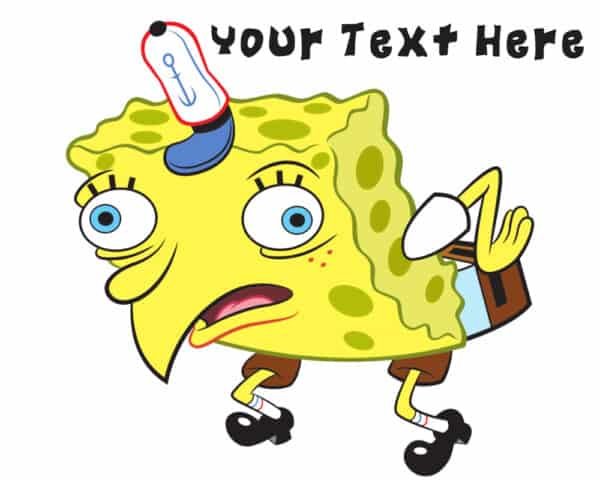
Before we get into the tools, let's unpack the phenomenon. "SpongeBob text" isn't just a quirky way to type; it's a cultural shorthand for sarcasm, ridicule, irony, or a playfully taunting attitude. It burst onto the scene in 2017 with the now-iconic "Mocking SpongeBob" meme, featuring a bent-over SpongeBob SquarePants image paired with derisive, mixed-case captions.
By 2018, the distinct alternating-case style had taken on a life of its own, becoming a powerful memetic tool even without the accompanying image. Think of it as a vocal inflection in text form: it allows you to convey tone that plain text simply can't, instantly signaling to your audience, "Yes, I'm being sarcastic." And no, despite what some might think, it's not a special font; it's simply standard Unicode letters with their cases flipped. This is precisely why it works seamlessly across virtually every digital platform, from Twitter to Discord, Instagram to Reddit, and Facebook.
Why You Need a Dedicated SpongeBob Text Generator
Sure, you could manually type out every alternating letter, painstakingly shifting between your Shift key. But why bother when an automated tool can do it instantly and flawlessly? SpongeBob text generators are designed for efficiency and consistency. They take your normal sentence and, with a single click, transform it into that signature mixed-case style.
These tools employ sophisticated (but simple-to-use) case-switching algorithms. Some follow a predictable, strict alternating pattern (e.g., Upper/lower/Upper), while others offer a more randomized approach, flipping cases with a 50/50 probability for each letter or word. The result is always the same: perfectly formatted, universally compatible sarcastic text, ready to paste wherever you need it.
Getting Started: How to Generate SpongeBob Text in Seconds
Using a SpongeBob text generator is incredibly straightforward, no matter which tool you choose. The basic process remains consistent across the board. Here's your simple, step-by-step guide:
- Open Your Chosen Generator: Navigate to the website of your preferred SpongeBob text generator. (Need a good one? You can create Spongebob text with many excellent online tools.)
- Input Your Text: Locate the input field, often labeled "Enter your text here" or similar. Type or paste the phrase, sentence, or paragraph you want to transform into SpongeBob text.
- Generate! Click the "Generate," "Convert," "Sarcasm-ify," or similar button. The tool will instantly process your input.
- Copy the Output: The newly generated mixed-case text will appear in an output field. Click the "Copy" button, usually located next to or below the output.
- Paste and Share: Now, simply paste your perfectly sarcastic text into your social media caption, chat message, forum reply, or meme editor. That's it—you're ready to mock!
Understanding Your Options: What to Look for in a Generator
While the core function of all SpongeBob text generators is the same, the best tools offer a range of features and customization options that can significantly enhance your mocking potential. When you're looking for the top performers, keep these aspects in mind:
The Core Styles: Beyond Simple Alternating
A truly versatile generator offers more than just a single method of case-switching. Look for tools that provide different "mocking styles," allowing you to fine-tune the level and appearance of your sarcasm:
- Classic Alternating (lIkE tHiS): This is the bread and butter, where every single letter alternates its case. It's the most recognizable and widely used style. A good generator will let you choose whether it starts with an uppercase or lowercase letter, offering subtle control over the look.
- Randomized (LiKe ThIs): Instead of a strict pattern, this style randomizes the capitalization of each letter with roughly a 50/50 probability. The result is often more chaotic and can feel even more derisive, as if the text itself is sputtering in disbelief.
- Word-by-Word (Like THIS): Some generators offer to alternate capitalization at the word level. For example, "like THIS is HOW it WORKS." This can create a different kind of emphasis and a slightly more formal, albeit still mocking, tone.
- Extreme Mockery (LiKe ThIs!): For when you really want to lean into the mockery, some tools offer an "extreme" style. This might involve a higher proportion of uppercase letters or a more aggressive randomization, making the text feel louder and more emphatic.
User Experience: Ease and Efficiency
The best tools are intuitive. You shouldn't need a manual to figure them out. Look for:
- Clean Interface: A straightforward layout with clear input and output fields, and easily identifiable "Generate" and "Copy" buttons. No intrusive ads or confusing navigation.
- Real-time Conversion: Some advanced tools will convert your text as you type, giving you instant feedback and allowing for quicker experimentation.
- Mobile Responsiveness: A good generator should work just as flawlessly on your phone or tablet as it does on a desktop, adapting to different screen sizes.
Our Review Approach: What Makes a Top SpongeBob Text Generator?
Since we're reviewing types of tools and their features rather than specific, named platforms (which can change frequently), our assessment focuses on what delivers the best user experience and the most versatile output.
Category 1: The "No-Frills, Just Works" Generators
These are the most common and often the fastest tools you'll encounter. They excel at doing one thing: converting your text to classic alternating case.
- Pros: Extremely easy to use, often the first result in a search, load quickly, no bloat. Perfect for quick, simple sarcasm.
- Cons: Limited customization. You typically get one style (classic alternating) and maybe an option to start with upper or lowercase. If you're looking for random or word-based styles, these won't cut it.
- Ideal User: Anyone who needs fast, reliable basic SpongeBob text without any fuss. Great for casual chat replies or quick social media comments.
Category 2: The "Customization King" Tools
These generators stand out by offering a wider array of styles (Classic, Random, Word, Extreme) and often provide fine-grained control over the output.
- Pros: High versatility, allowing users to tailor the mockery to their exact needs. Want subtle sarcasm? Go classic. Want unhinged ridicule? Try "extreme" random. The ability to choose starting case (uppercase or lowercase) is a small but valuable detail for aesthetic control.
- Cons: Can sometimes have slightly more complex interfaces due to more options. Some might feel a little slower to load with all the extra features.
- Ideal User: Meme connoisseurs, content creators, or anyone who frequently uses SpongeBob text and wants to master its nuances. If you want your text to truly stand out, these are your go-to.
Category 3: The "Social Media Savvy" Generators
Some generators prioritize features that make sharing and integration with social platforms seamless. This might include character counters, direct sharing buttons, or optimized output for specific networks.
- Pros: Streamlined for sharing, helpful for platforms with character limits (like Instagram captions under 100 characters for optimal readability). May offer tips directly relevant to social posting.
- Cons: The "social savvy" aspect might sometimes be a secondary feature to the core text generation, or it might be overly focused on sharing at the expense of text customization.
- Ideal User: Social media managers, influencers, or heavy platform users who want to quickly generate and post content without leaving their workflow.
Our Verdict: The truly top generators usually fall into the "Customization King" category, often incorporating elements of "No-Frills" ease of use and "Social Media Savvy" awareness. They hit the sweet spot of being powerful enough for diverse creative expression, yet simple enough for anyone to pick up and use instantly. They understand that the power of SpongeBob text lies in its immediate impact, and they facilitate that impact with options and efficiency.
Master the Art: Best Practices for Using SpongeBob Text
Generating the text is only half the battle; wielding it effectively is an art form. Here's how to maximize your mocking impact:
Keep it Short and Punchy
Sarcasm shines brightest when it's concise. Long paragraphs of mixed-case text quickly become difficult to read and lose their comedic effect. Aim for short, punchy phrases or single sentences for maximum impact and readability. Think viral soundbites, not academic essays.
Combine with the Classic Image
For the quintessential "Mocking SpongeBob" experience, pair your generated text with the original bent-over SpongeBob meme image. This instantly contextualizes your sarcasm and triggers recognition in your audience. Tools for basic image editing, often available online for free, can help you quickly combine text and image.
Enhance with Emojis
A well-placed emoji can amplify your sarcastic tone. Consider adding a 🐔 (chicken emoji) to suggest clucking like a coward, or a 🤡 (clown emoji) to imply foolishness. These visual cues work in tandem with the text to hammer home your message.
Platform-Specific Nuances
While SpongeBob text works everywhere, a few platform-specific tips can optimize your usage:
- Instagram: Keep sarcastic captions relatively short, ideally under 100 characters. This ensures the text is fully visible without needing to tap "more" and reads clearly on various mobile devices.
- Twitter: This style is frequently used in quote tweets. It's a powerful way to parody or visually express disdain for an original tweet, adding a layer of ironic commentary that plain text might miss. It's an immediate, visual "I can't believe you just said that."
- Discord/Messaging Apps: Great for quick, playful jabs in group chats. Use it to mock friends lightheartedly or to express exasperation.
Don't Overuse It
Like any good comedic device, SpongeBob text loses its power with overuse. Employ it strategically for moments that genuinely warrant sarcasm or ridicule. If every message you send is in mixed case, it becomes background noise rather than a pointed statement.
Debunking Myths: Common Questions About SpongeBob Text
Let's clear up some common misconceptions and answer frequently asked questions about this iconic text style.
Is SpongeBob text a special font?
No, definitely not. SpongeBob text is simply standard Unicode letters that alternate between uppercase and lowercase. It's not a unique typeface like Comic Sans or Arial. This is precisely why it works universally across all platforms without compatibility issues. While the show's title does use a bubble-style typeface, the "mocking text" is purely about case alternation.
Can I use it on all social media platforms?
Absolutely. Because it relies on standard Unicode characters, SpongeBob text is fully compatible with Twitter, Instagram, Discord, Reddit, Facebook, TikTok, messaging apps like WhatsApp, and virtually any other platform that supports regular text input. You generate it, you copy it, you paste it – it will display correctly.
Is it always free to use these generators?
For the vast majority of online SpongeBob text generators, yes, they are completely free to use without limits. These tools are often created by developers for fun or as part of a larger suite of free online utilities. You shouldn't expect to pay for this functionality.
How does the generator actually work?
At its core, a SpongeBob text generator uses a simple algorithm. When you input your text, the algorithm processes each character (or word, depending on the chosen style) and decides whether to convert it to uppercase or lowercase. For "classic" style, it just alternates: first letter upper, second lower, third upper, and so on. For "random" style, it makes a coin-flip decision (50/50 chance) for each letter. The output is then assembled and presented for you to copy.
Can I choose whether it starts with a capital or lowercase letter?
Many of the better generators offer this option. It's a small detail, but it allows for subtle control over the visual flow of your sarcastic message. For example, "lIkE tHiS" versus "LiKe ThIs" can have a slightly different feel.
Beyond the Meme: The Power of Intentional Communication
While rooted in internet meme culture, the widespread adoption of SpongeBob text generators highlights a deeper need: the desire to convey nuanced tone in text-based communication. Without facial expressions, vocal inflections, or body language, text can often fall flat or be misinterpreted. Tools like these bridge that gap, allowing you to explicitly signal sarcasm, humor, or disbelief.
By understanding how these generators work and how to use them effectively, you're not just creating funny memes; you're becoming a more intentional and expressive digital communicator. You're adding another arrow to your quiver in the ongoing quest to make your online voice truly heard—and laughed at.
Your Next Move: Go Forth and Sarcasm-ify!
You're now equipped with the knowledge to not only understand SpongeBob text but to master its creation. You know what makes a generator stand out, how to choose the right style for your message, and the best practices to ensure your sarcasm lands perfectly every time.
So, what are you waiting for? Head over to your favorite browser, find a top-tier SpongeBob text generator that fits your style (perhaps one with those handy customization options!), and start transforming your plain text into pure comedic gold. Whether you're roasting a friend, parodying a ludicrous statement, or simply adding a dash of irony to your day, remember: a well-placed sArCaStIc RePlY can make all the difference.